
Line GAS の連携ができなくて、Cloudflare Workers を使って自動通知を送る
これは何❓
弊社では毎日朝にミーティングを行なっているのですが、LineにミーティングのURLを自動で送付してほしいなと思い。
LineBotを使って自動化した話です。
⚙️機能
毎日11:00(JST)に Google Meet のURLをLINEグループへ自動投稿
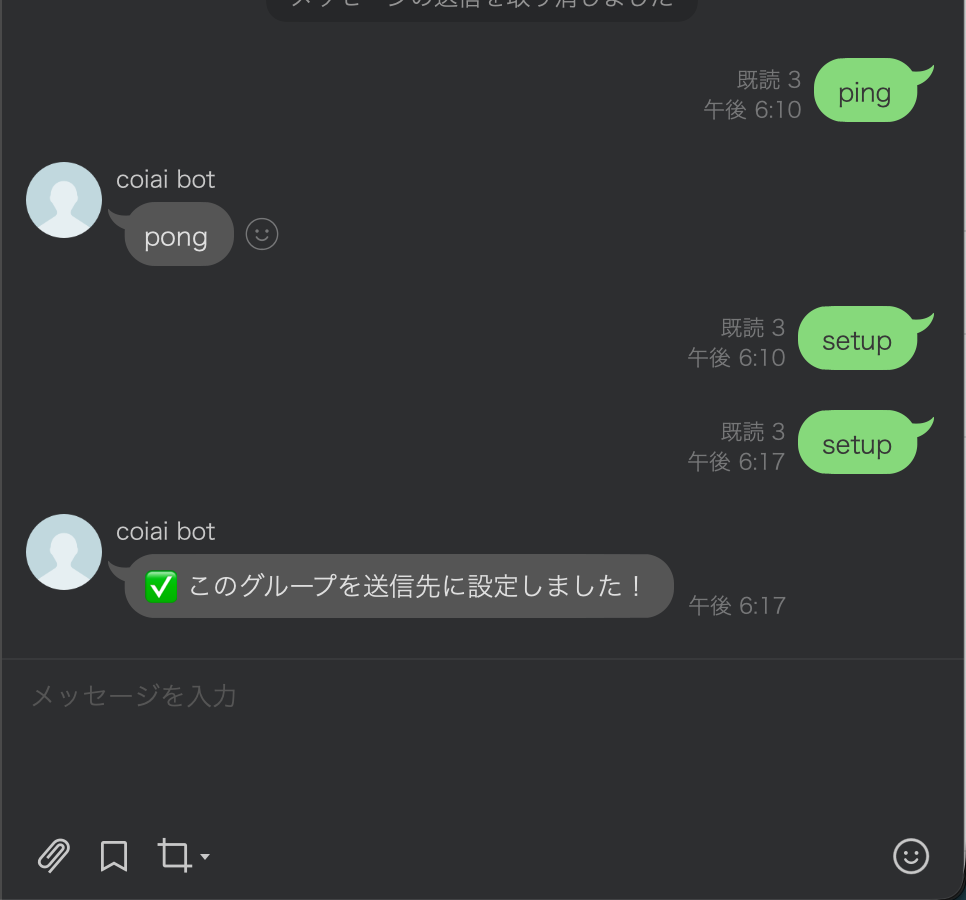
• LINEグループで setup とメッセージする → 送信先グループIDを取得して保存
• LINEグループで ping → pong(できてるかの確認)
• Cloudflare Cron(Workflow)で毎日実行 → LINEにMeet URLをpush
Google App Script と Line で試してみた
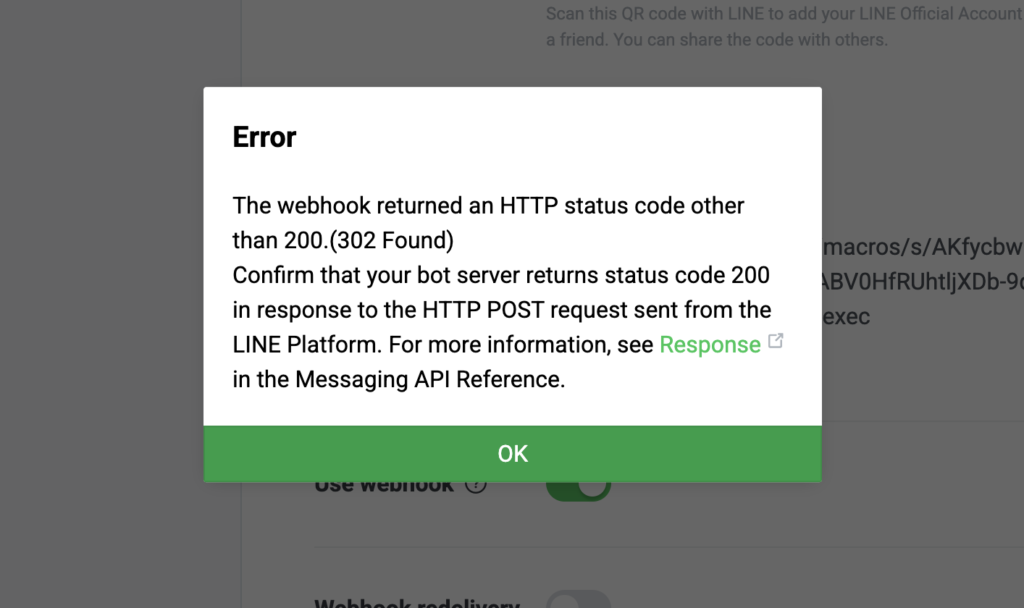
Line と Google App Script を使うと302エラーが出て動作が安定しなかったので他の方法を試すことにしました。
事前準備(Cloudflare / LINE)
1) LINE Developers(Messaging API)
こちらの記事を参考にさせていただきました!
• Webhook URL:https://<あなたのworker>.workers.dev/
• Use webhook:ON
• 応答メッセージ:OFF(推奨)
• BotをLINEグループに招待
2) Cloudflare Workersで設定したこと
Cloudflare Workersとは、ざっくり言うと 「超軽量なサーバーレス関数(JavaScript/TypeScript)」です。
サーバーを用意せずに、HTTPリクエストを受けて処理して返すことができます!
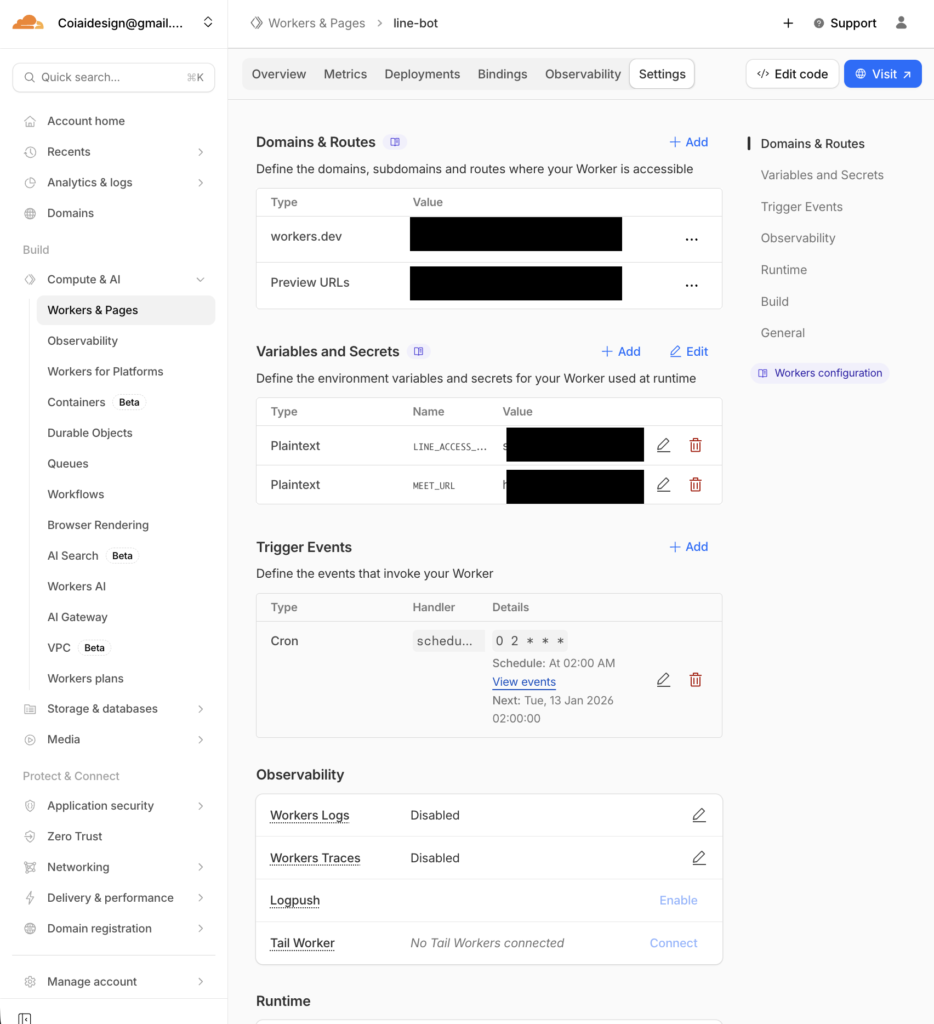
Secretsの設定
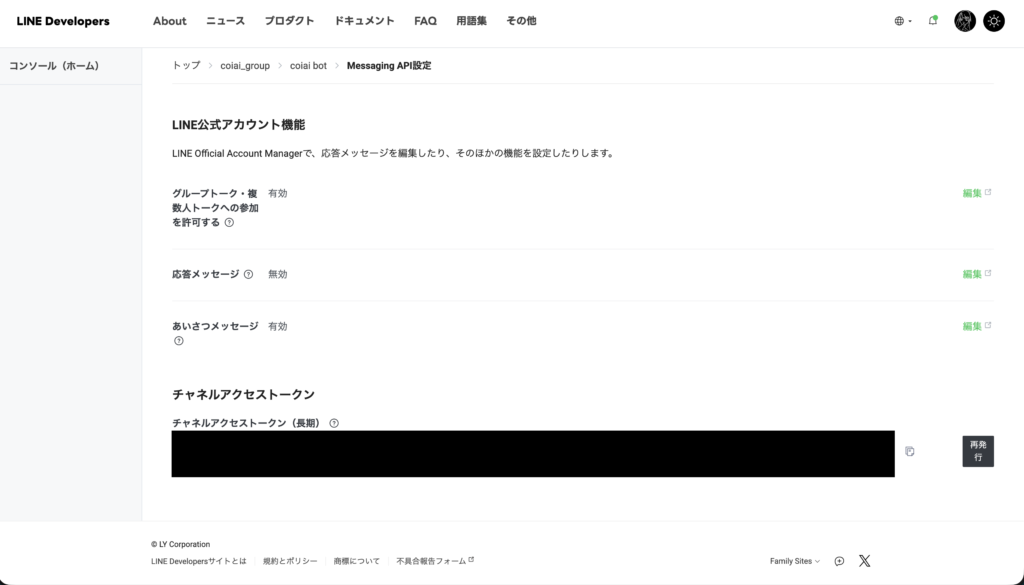
• LINE_ACCESS_TOKEN:長期チャネルアクセストークン(Messaging API)
• MEET_URL:毎日投下したいGoogle MeetのURL
アクセストークンは Line Developers からコピーしておいて
Workers & Pages の Variables and Secrets に Add してあげればOKです。
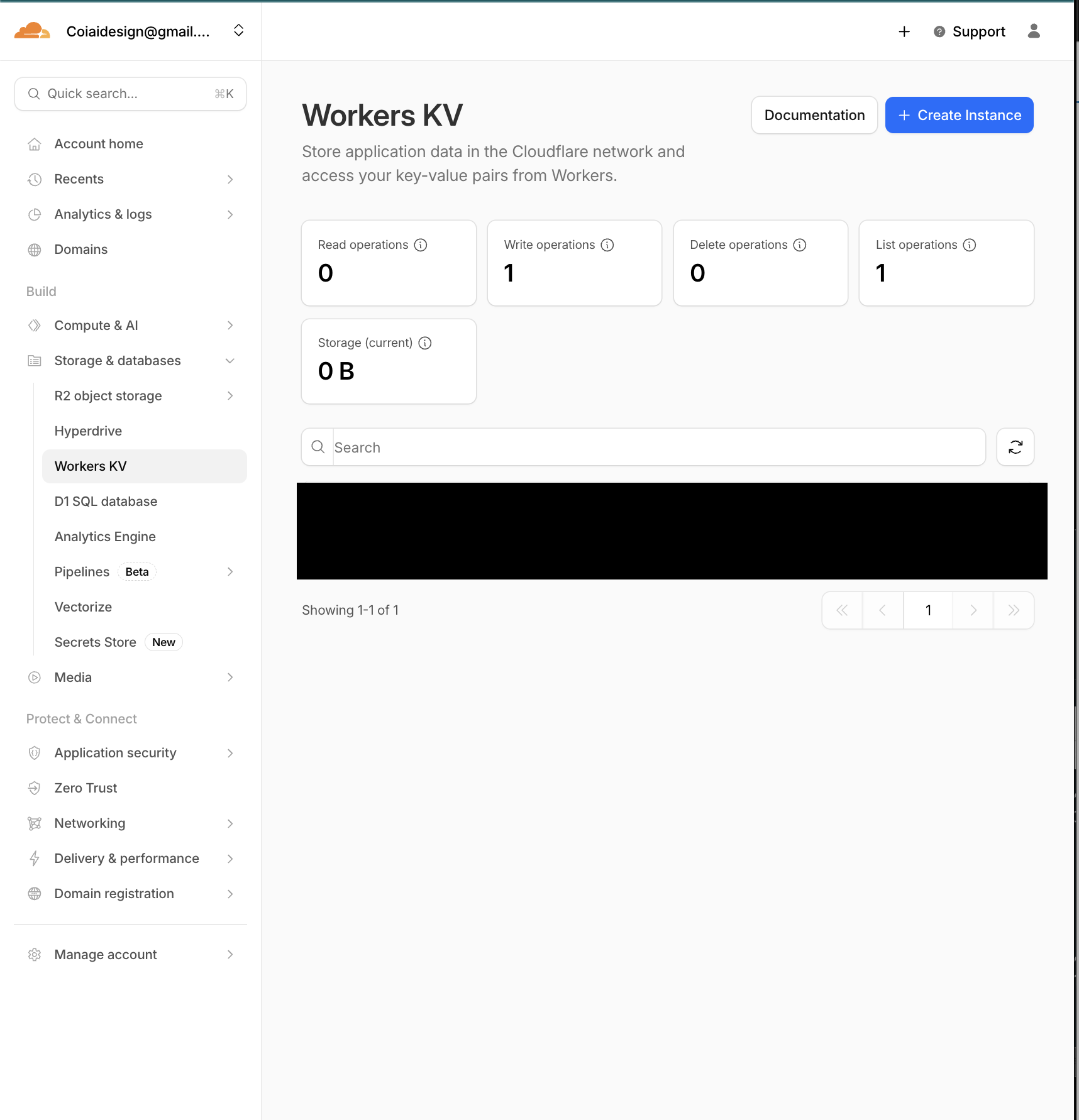
KVの設定
• namespaceを作成(例:LINE_KV)
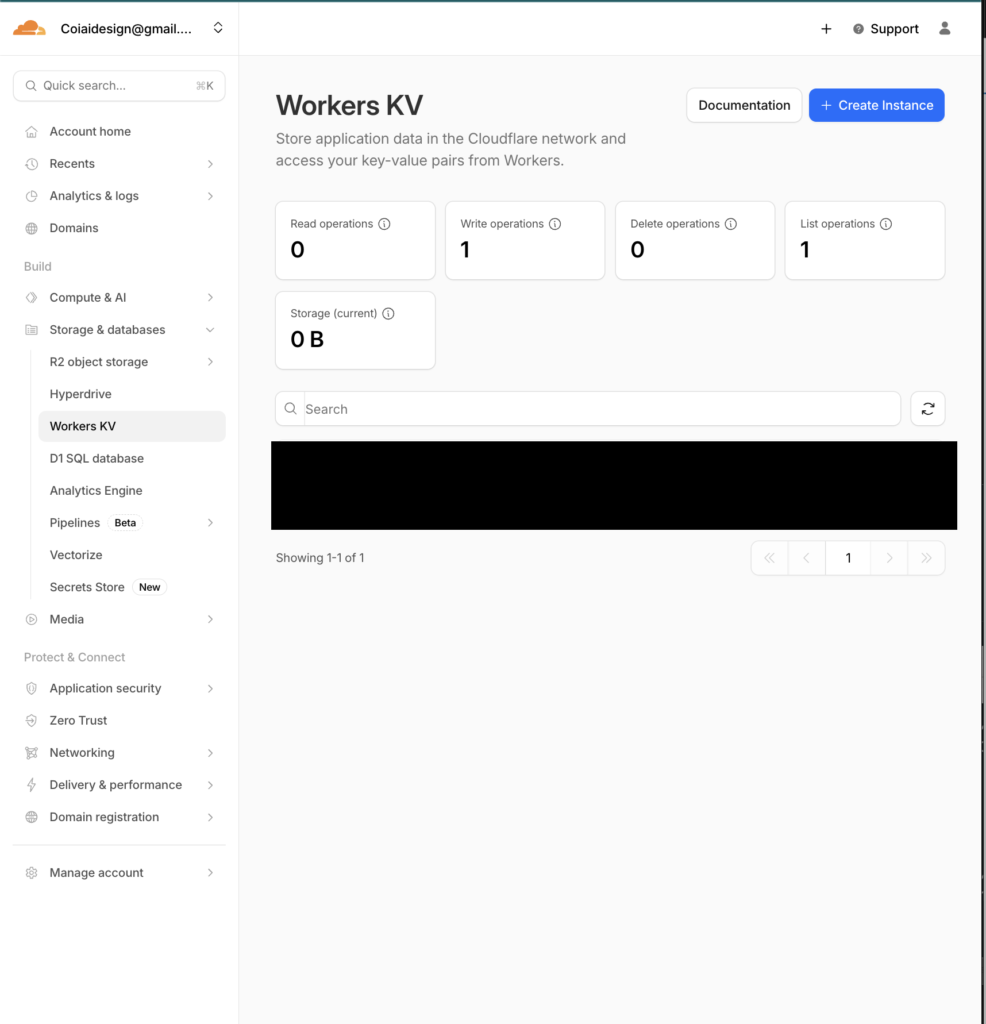
• Binding
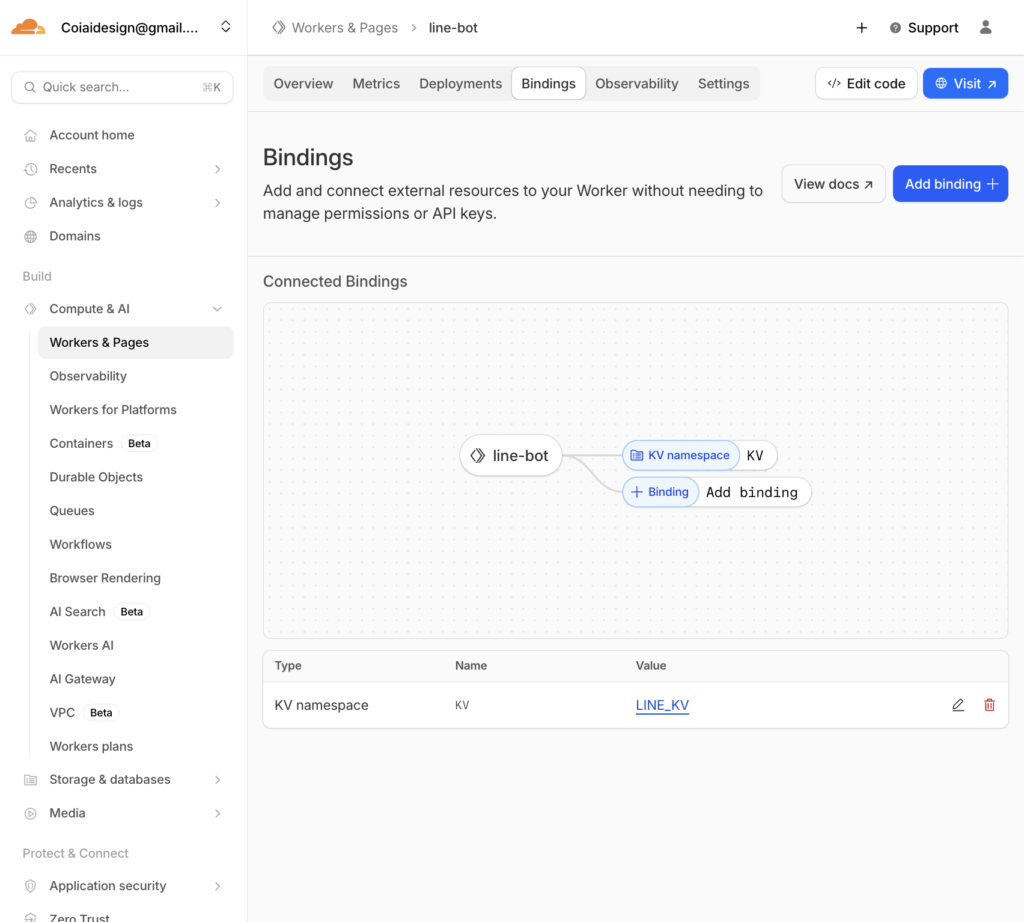
Cron Trigger
• 毎日11:00 JST → UTC 02:00 なので
• Cron:0 2 * * *
実装(そのまま動く src/index.js)
※トークンはコードに直書きせず、Secretに設定しました!
// src/index.js
// src/index.js
export default {
  // LINE Webhook 受信
  async fetch(request, env, ctx) {
    const reqId = crypto.randomUUID();
    const url = new URL(request.url);

    console.log(`[${reqId}] ===== fetch start =====`);
    console.log(`[${reqId}] method=${request.method} path=${url.pathname}`);

    // GETなどは疎通確認用に200で返す
    if (request.method !== "POST") {
      console.log(`[${reqId}] non-POST -> 200 OK`);
      return new Response("OK", { status: 200 });
    }

    // Bodyを一旦テキストで受けてログ(※個人情報が入る可能性があるので運用で注意)
    let raw = "";
    try {
      raw = await request.text();
      console.log(`[${reqId}] raw body=${raw}`);
    } catch (e) {
      console.log(`[${reqId}] body read error`, e);
      return new Response("OK", { status: 200 });
    }

    // JSON parse
    let body;
    try {
      body = JSON.parse(raw || "{}");
    } catch (e) {
      console.log(`[${reqId}] JSON parse error`, e);
      return new Response("OK", { status: 200 });
    }

    // Verify は events=[] のことがある → 200返して終わり
    const event = body?.events?.[0];
    if (!event) {
      console.log(`[${reqId}] no events (verify?) -> 200 OK`);
      return new Response("OK", { status: 200 });
    }

    console.log(`[${reqId}] event.type=${event.type}`);
    console.log(`[${reqId}] source=${JSON.stringify(event.source || {})}`);

    // replyToken がないイベントもある
    const replyToken = event.replyToken;
    console.log(`[${reqId}] hasReplyToken=${!!replyToken}`);

    // メッセージイベントだけ処理(必要なら拡張)
    if (event.type === "message" && event.message?.type === "text") {
      const text = (event.message.text || "").trim();
      const lower = text.toLowerCase();
      console.log(`[${reqId}] text="${text}"`);

      // ping → 動作確認
      if (lower === "ping") {
        if (!replyToken) return new Response("OK", { status: 200 });
        await safeReply(env, reqId, replyToken, "pong");
        return new Response("OK", { status: 200 });
      }

      // setup → groupId を KV に保存(グループ内で実行)
      if (lower === "setup") {
        const source = event.source || {};
        if (source.type === "group" && source.groupId) {
          await env.KV.put("LINE_GROUP_ID", source.groupId);
          console.log(`[${reqId}] saved LINE_GROUP_ID=${source.groupId}`);

          if (replyToken) {
            await safeReply(env, reqId, replyToken, "✅ このグループを送信先に設定しました!");
          }
          return new Response("OK", { status: 200 });
        } else {
          console.log(`[${reqId}] setup called but not in group`);
          if (replyToken) {
            await safeReply(env, reqId, replyToken, "⚠️ setup はグループ内で送ってください(グループIDが取れません)");
          }
          return new Response("OK", { status: 200 });
        }
      }

      // その他のテキストは無視(必要ならここで返信してもOK)
      console.log(`[${reqId}] text ignored`);
    } else {
      console.log(`[${reqId}] non-text message or non-message event ignored`);
    }

    return new Response("OK", { status: 200 });
  },

  // Cron Trigger(毎日送信)
  async scheduled(event, env, ctx) {
    const runId = crypto.randomUUID();
    console.log(`[${runId}] ===== scheduled start =====`);
    console.log(`[${runId}] cron=${event.cron}`);

    const groupId = await env.KV.get("LINE_GROUP_ID");
    console.log(`[${runId}] groupId=${groupId}`);

    if (!groupId) {
      console.log(`[${runId}] no groupId saved -> skip`);
      return;
    }

    const meetUrl = env.MEET_URL;
    console.log(`[${runId}] hasMeetUrl=${!!meetUrl}`);

    if (!meetUrl) {
      console.log(`[${runId}] MEET_URL missing -> skip`);
      return;
    }

    const msg = `今日のGoogle Meetはこちら👇\n${meetUrl}`;
    await safePush(env, runId, groupId, msg);

    console.log(`[${runId}] ===== scheduled end =====`);
  },
};

// --- LINE Reply(失敗しても例外で落とさずログを残す) ---
async function safeReply(env, reqId, replyToken, text) {
  if (!env.LINE_ACCESS_TOKEN) {
    console.log(`[${reqId}] LINE_ACCESS_TOKEN missing (secret not set?)`);
    return;
  }

  try {
    const res = await fetch("https://api.line.me/v2/bot/message/reply", {
      method: "POST",
      headers: {
        "Content-Type": "application/json",
        "Authorization": `Bearer ${env.LINE_ACCESS_TOKEN}`,
      },
      body: JSON.stringify({
        replyToken,
        messages: [{ type: "text", text }],
      }),
    });

    const body = await res.text();
    console.log(`[${reqId}] reply status=${res.status} body=${body}`);
  } catch (e) {
    console.log(`[${reqId}] reply fetch error`, e);
  }
}

// --- LINE Push(Cronなど任意タイミング用) ---
async function safePush(env, runId, to, text) {
  if (!env.LINE_ACCESS_TOKEN) {
    console.log(`[${runId}] LINE_ACCESS_TOKEN missing (secret not set?)`);
    return;
  }

  try {
    const res = await fetch("https://api.line.me/v2/bot/message/push", {
      method: "POST",
      headers: {
        "Content-Type": "application/json",
        "Authorization": `Bearer ${env.LINE_ACCESS_TOKEN}`,
      },
      body: JSON.stringify({
        to,
        messages: [{ type: "text", text }],
      }),
    });

    const body = await res.text();
    console.log(`[${runId}] push status=${res.status} body=${body}`);
  } catch (e) {
    console.log(`[${runId}] push fetch error`, e);
  }
}
/wrangler.toml
name = "line-meet-bot"
main = "src/index.js"
compatibility_date = "2026-01-12"
動作確認
1. LINEグループにBotを招待
2. グループで ping → pong が返る
3. グループで setup → 「設定しました」が返る
(※KV未設定だとここで無反応になりがち)
4. Cronを 0 2 * * * に設定
5. 翌日から毎日11:00(JST)にMeet URLが投稿される

coiai
この記事もおすすめ


この記事を書いた会社
株式会社coiaiは、「想像できることを美しく実現」を掲げ、XR・Web・アプリ・システム開発およびDX支援を行う会社です。 創業2022年、東京都練馬区に本社を置き、要件のヒアリングからPoC(概念実証)、本番運用まで一貫して伴走します。 まずはお気軽にご相談ください。
主なご相談内容
- Webサイト・Webアプリの設計・開発
- スマートフォンアプリ(iOS / Android)の開発
- XR・AR・VRを活用した体験設計・開発
- DX推進・業務システムの企画・開発
- PoC(概念実証)から本番運用までの伴走支援
- マーケティング・コンサルティング
詳しい会社情報は会社概要ページでご覧いただけます。