What is this?
This article covers getting chromedriver set up so you can run web scraping.
ChromeDriver is a tool for automatically controlling the Google Chrome browser. It implements the WebDriver protocol and is mainly used to automate testing of web applications. ChromeDriver is especially handy when paired with Selenium, an open-source automation framework, for scripting browser actions.
🪴 Environment
- Apple Silicon M1 MacBook Air
- 16 Gb
- macOS Sequoia 15.0
- chromedriver version : ChromeDriver 129.0.6668.58
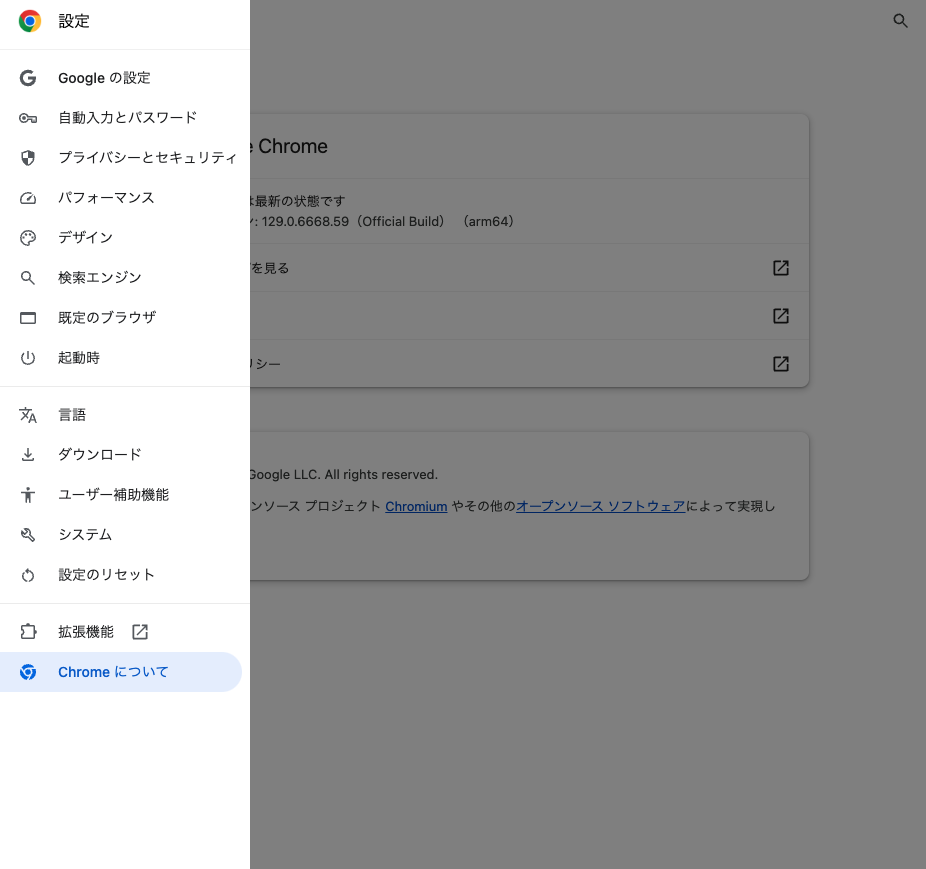
- Google Chrome version : 129.0.6668.59(Official Build) (arm64)
- Verified working as of 2024/09/18
🛠️ Steps
First, create a directory to work in.
mkdir scrapingTestCreate a virtual environment using the venv module.
A directory named venv will be added to the current directory.
python -m venv venvActivate the virtual environment
source venv/bin/activateInstall the required libraries
pip install requests beautifulsoup4 selenium- requests: a library for fetching data from web pages.
- BeautifulSoup4: a library for parsing HTML and XML data and extracting the information you need.
- Selenium: an automation library for handling content generated with JavaScript. Also works with dynamic pages.
Installing ChromeDriver
Installing ChromeDriver
On Mac, install it with brew.
brew install chromedriverIf you'd rather download it from the website, you should be able to grab the latest stable version for your OS from the link below.https://googlechromelabs.github.io/chrome-for-testing/#stable
Check the path to chromedriver
which chromedriverI wasn't able to check this with brew –prefix, since it just returned "No available formula with the name "chromedriver". Did you mean chrome-cli?". There's probably a fix for that, but...
Confirming it runs
Create a Python file
touch scraper.pyfrom selenium import webdriver
# ChromeDriverのパスを指定
driver = webdriver.Chrome(executable_path='/opt/homebrew/bin/chromedriver')
# 例: Webページにアクセス
driver.get('https://coiai.boy.jp')
# ブラウザを閉じる
driver.quit()In my case, the path that got printed out was /opt/homebrew/bin/chromedriver, so that's what I've plugged in here.
If the file above runs correctly, you should see my blog briefly pop up in a browser window before it closes.
There's no output in the terminal.
Signs that it failed
[Case 1] System settings issue
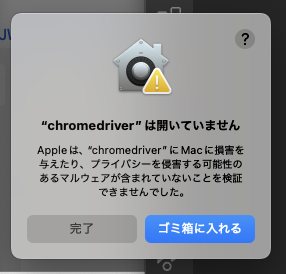
When you run it, you might see the popup below.
Apple could not verify "chromedriver" is free of malware that may harm your Mac or compromise your privacy.
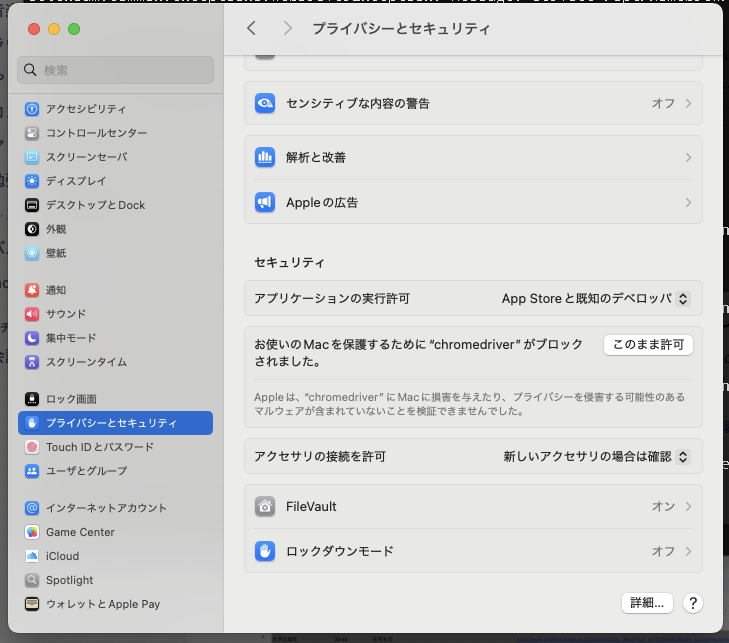
If that happens, open System Settings.
Click Privacy & Security, and scroll to the bottom — you should see a message saying "chromedriver" was blocked to protect your Mac.
Click the "Allow Anyway" button next to it, then run it again from the terminal and it should work.
[Case 2] Version mismatch between ChromeDriver and Chrome
If you get an error like the one below, your installed Chrome and chromedriver versions probably don't match.
Traceback (most recent call last):
  File "/Users/coiai/Code/scrapingTest/scraper.py", line 6, in <module>
    driver = webdriver.Chrome(service=service)
             ^^^^^^^^^^^^^^^^^^^^^^^^^^^^^^^^^
  File "/Users/coiai/Code/scrapingTest/venv/lib/python3.12/site-packages/selenium/webdriver/chrome/webdriver.py", line 45, in __init__
    super().__init__(
  File "/Users/coiai/Code/scrapingTest/venv/lib/python3.12/site-packages/selenium/webdriver/chromium/webdriver.py", line 66, in __init__
    super().__init__(command_executor=executor, options=options)
  File "/Users/coiai/Code/scrapingTest/venv/lib/python3.12/site-packages/selenium/webdriver/remote/webdriver.py", line 212, in __init__
    self.start_session(capabilities)
  File "/Users/coiai/Code/scrapingTest/venv/lib/python3.12/site-packages/selenium/webdriver/remote/webdriver.py", line 299, in start_session
    response = self.execute(Command.NEW_SESSION, caps)["value"]
               ^^^^^^^^^^^^^^^^^^^^^^^^^^^^^^^^^^^^^^^
  File "/Users/coiai/Code/scrapingTest/venv/lib/python3.12/site-packages/selenium/webdriver/remote/webdriver.py", line 354, in execute
    self.error_handler.check_response(response)
  File "/Users/coiai/Code/scrapingTest/venv/lib/python3.12/site-packages/selenium/webdriver/remote/errorhandler.py", line 229, in check_response
    raise exception_class(message, screen, stacktrace)
selenium.common.exceptions.SessionNotCreatedException: Message: session not created: This version of ChromeDriver only supports Chrome version 129
Current browser version is 128.0.6613.138 with binary path /Applications/Google Chrome.app/Contents/MacOS/Google Chrome
Stacktrace:
0   chromedriver                        0x0000000102457ed4 cxxbridge1$str$ptr + 1906348
1   chromedriver                        0x0000000102450344 cxxbridge1$str$ptr + 1874716
2   chromedriver                        0x0000000102064264 cxxbridge1$string$len + 89492
3   chromedriver                        0x000000010209a1dc cxxbridge1$string$len + 310540
4   chromedriver                        0x0000000102099404 cxxbridge1$string$len + 306996
5   chromedriver                        0x00000001020951b0 cxxbridge1$string$len + 290016
6   chromedriver                        0x00000001020916c0 cxxbridge1$string$len + 274928
7   chromedriver                        0x00000001020d2188 cxxbridge1$string$len + 539832
8   chromedriver                        0x00000001020d1ac8 cxxbridge1$string$len + 538104
9   chromedriver                        0x000000010209d134 cxxbridge1$string$len + 322660
10  chromedriver                        0x000000010209dd84 cxxbridge1$string$len + 325812
11  chromedriver                        0x000000010241ff90 cxxbridge1$str$ptr + 1677160
12  chromedriver                        0x00000001024248fc cxxbridge1$str$ptr + 1695956
13  chromedriver                        0x00000001024054b8 cxxbridge1$str$ptr + 1567888
14  chromedriver                        0x00000001024251cc cxxbridge1$str$ptr + 1698212
15  chromedriver                        0x00000001023f6a60 cxxbridge1$str$ptr + 1507896
16  chromedriver                        0x0000000102441214 cxxbridge1$str$ptr + 1812972
17  chromedriver                        0x000000010244136c cxxbridge1$str$ptr + 1813316
18  chromedriver                        0x000000010244ffe4 cxxbridge1$str$ptr + 1873852
19  libsystem_pthread.dylib             0x000000019abbf2e4 _pthread_start + 136
20  libsystem_pthread.dylib             0x000000019abba0fc thread_start + 8
chromedriver --versionCompare the version this returns with the version shown under Chrome's settings, in the About Chrome section. (Update if needed.)