
I'm building an app for macOS.
When you use a Slider inside a Form, it gets split horizontally into a label side and a slider side.
The screenshot below shows the problem.

In the end I couldn't find a real solution, so I gave up on Form and instead built a makeshift "Form" using a VStack, as shown below.
That let me get the Slider to render at full width, as you can see here.
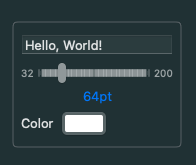
Here's the VStack that stands in for a Form section.
struct CustomVStack<Content: View>: View {
    let content: Content

    init(@ViewBuilder content: () -> Content) {
        self.content = content()
    }

    var body: some View {
        VStack(alignment: .leading, content: {
            content
        })
        .padding(.vertical, 12)
        .padding(.horizontal, 8)
        .frame(maxWidth: .infinity)
        .overlay(
            RoundedRectangle(cornerRadius: 4)
                .stroke(Color.gray, lineWidth: 0.5)
        )
    }
}
To use it, just call it from another view like this.
CustomVStack {
    TextField("Text", text: $inputText)
        .font(.body)
    SizeSlider(textSize: $textSize)
    ColorPicker("Color", selection: $textColor)
}

CustomVStack {
    FolderColorPicker(folderColor: $folderColor)
}