
Alright, everyone! Today I'm going to show you how to wrap SwiftUI elements onto a new row every N items!
Here's what we'll end up with!
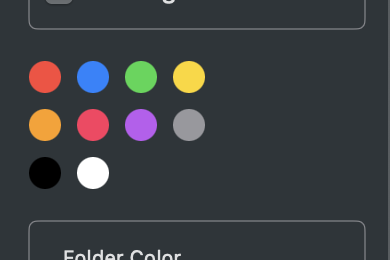
Let's say you've got some code like this
let colors: [Color] = [.red, .blue, .green, .yellow, .orange, .pink, .purple, .gray, .black, .white]

HStack(spacing: 8) {
    ForEach(colors, id: \.self) { color in
        Circle()
            .fill(color)
            .frame(width: 8, height: 8)
            .tag(color)
            .onTapGesture {
                self.selectedColor = color
            }
    }
}
.pickerStyle(.segmented)
This code just lines the colors up in a single row, but what if you want to split them across multiple rows? That's what we're here to figure out.
Here's how you do it
let colors: [Color] = [.red, .blue, .green, .yellow, .orange, .pink, .purple, .gray, .black, .white]

let itemsPerRow = 4

VStack {
    ForEach(0..<(colors.count + itemsPerRow - 1) / itemsPerRow, id: \.self) { row in
        HStack(spacing: 8) {
            ForEach(0..<itemsPerRow, id: \.self) { item in
                let index = row * itemsPerRow + item
                if index < colors.count {
                    let color = colors[index]
                    Circle()
                        .fill(color)
                        .frame(width: 8, height: 8)
                        .tag(color)
                        .onTapGesture {
                            self.selectedColor = color
                        }
                }
            }
        }
    }
}
.pickerStyle(.segmented)
In this code, we set the number of items per row (itemsPerRow), then use a ForEach loop over each row and each item,
calculating each item's index as row * itemsPerRow + item, and only showing the corresponding colored circle when that index falls within the bounds of the colors array.
And with that, you can split an array of colors into rows of however many items you want!
Just keep in mind the last row might have fewer items than the others — adjust accordingly if that's an issue for you.
Also feel free to tweak the spacing and frame values as needed. This code is just one example, after all!
And that wraps up how to lay out N elements per row in SwiftUI! Go ahead and give it a try yourself!