
In my Flutter project
import Flutter
import UIKit
import GoogleMaps

@main
@objc class AppDelegate: FlutterAppDelegate {
  override func application(
    _ application: UIApplication,
    didFinishLaunchingWithOptions launchOptions: [UIApplication.LaunchOptionsKey: Any]?
  ) -> Bool {
    GMSServices.provideAPIKey(ProcessInfo.processInfo.environment["MY_API_KEY"]!)
    GeneratedPluginRegistrant.register(with: self)
    return super.application(application, didFinishLaunchingWithOptions: launchOptions)
  }
}
Thread 1: Fatal error: Unexpectedly found nil while unwrapping an Optional valueI got this error.
At this point, I decided to stop hardcoding the API key directly and instead put it in an environment variable.
How to do it
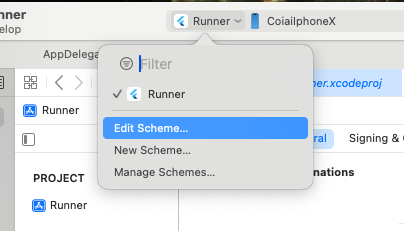
In Xcode, click the project name and you'll see an item called Edit Scheme… Click it.
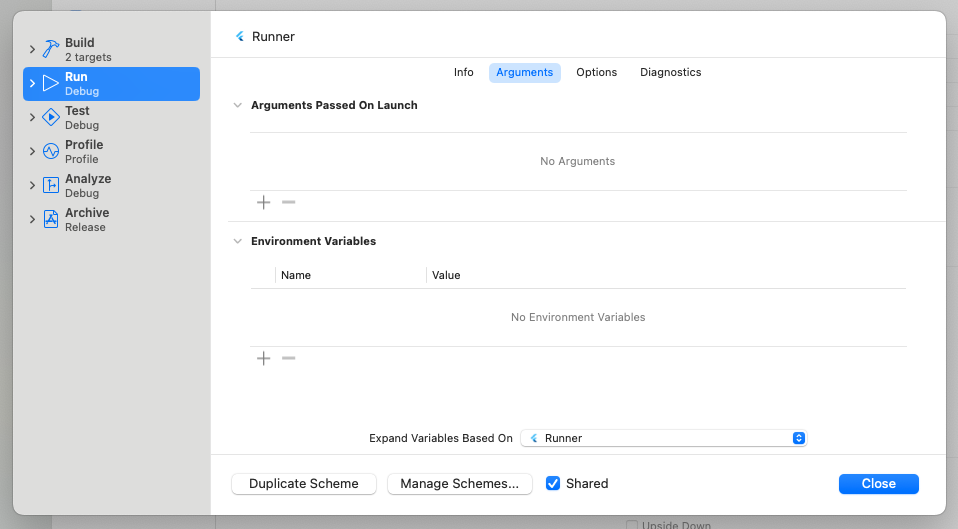
Press the + button under Environment Variables to add one.
GOOGLE_MAPS_API_KEY

hogehogehogehogehogehogehogeho
I set the Name and Value something like that.
After that, I rewrote AppDelegate.swift as follows.
import Flutter
import UIKit
import GoogleMaps

@main
@objc class AppDelegate: FlutterAppDelegate {
  override func application(
    _ application: UIApplication,
    didFinishLaunchingWithOptions launchOptions: [UIApplication.LaunchOptionsKey: Any]?
  ) -> Bool {

      // Xcode の環境変数から APIキー を取得
      if let apiKey = ProcessInfo.processInfo.environment["GOOGLE_MAPS_API_KEY"], !apiKey.isEmpty {
          GMSServices.provideAPIKey(apiKey)
      } else {
          fatalError("Google Maps API Key is missing. Please set GOOGLE_MAPS_API_KEY in Xcode's Environment Variables.")
      }

    GeneratedPluginRegistrant.register(with: self)
    return super.application(application, didFinishLaunchingWithOptions: launchOptions)
  }
}
And with that, it worked! Yay.