
I'm building an app for macOS.
After adding video playback functionality, black bars showed up along the sides.
(In the image below: black bars appear on the left and right, inside the purple border.)
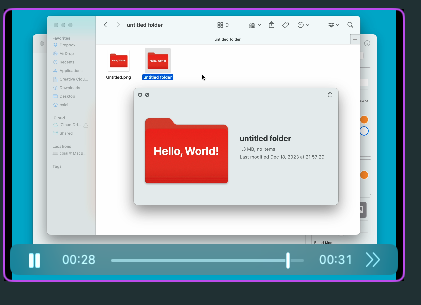
I looked into it and found articles about removing this on iOS, but that approach doesn't work on macOS, so I'm leaving a record here of what I tried.
Following what this post describes gets you the result in the image below. It ends up spilling past the rounded corners, so it needs some more tuning…
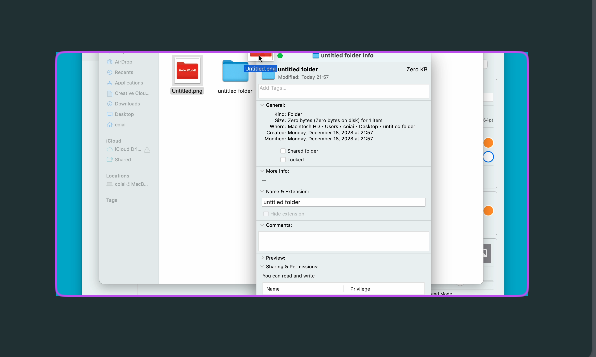
Prep work — getting video playback working
First, let's start by preparing the video. Add the video file you want to play to your project, and set its URL on AVPlayer.
import SwiftUI
import AVKit

struct VideoView: View {
    private let player = AVPlayer(url: Bundle.main.url(forResource: "HowToSetIcon", withExtension: "mov")!)

    var body: some View {
        PlayerView(player: player)
    }
}
How to get rid of the black bars
Next, borrowing some help from AppKit, wrap AVPlayerView using NSViewRepresentable. This lets you make the video fit the entire view.
struct PlayerView: NSViewRepresentable {
    let player: AVPlayer

    func makeNSView(context: Context) -> NSView {
        let playerView = AVPlayerView()
        playerView.player = player
        return playerView
    }

    func updateNSView(_ nsView: NSView, context: Context) {
        // none
    }
}

class AVPlayerView: NSView {
    var player: AVPlayer? {
        didSet {
            (self.layer as? AVPlayerLayer)?.player = player
        }
    }

    override init(frame frameRect: NSRect) {
        super.init(frame: frameRect)
        self.wantsLayer = true
    }

    required init?(coder: NSCoder) {
        super.init(coder: coder)
        self.wantsLayer = true
    }

    override var layer: CALayer? {
        didSet {
            guard let layer = self.layer as? AVPlayerLayer else { return }
            layer.videoGravity = .resizeAspectFill
        }
    }

    override func makeBackingLayer() -> CALayer {
        return AVPlayerLayer()
    }
}
This makes the video display full-screen, with no play/stop UI controls shown. That, in turn, prevents the black bars from showing up next to the video.
On second thought, this is a pain (update)
The standard SwiftUI player comes with a built-in play/stop button and seek bar on hover, so once you switch to AppKit you have to build all of that yourself, which is rough…
As I mentioned at the start, I still don't know how to make it clip properly when CornerRadius is applied.
In the end, I just edited the video itself to change its ratio and specified AspectRatio instead. I gave up trying to make the cropping work nicely in code…
VideoPlayer(player: player)
        .aspectRatio(4 / 3, contentMode: .fit)