
I recreated a fire particle effect using Reality Composer Pro, so here are some screenshots of the settings I used.
Emitter
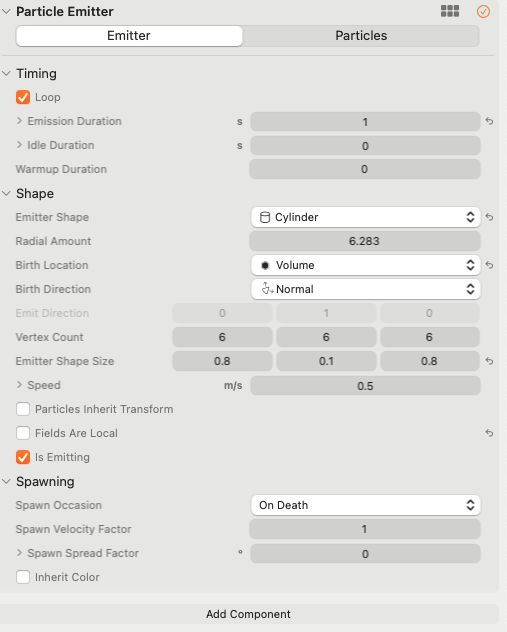
First, the emitter settings.
The official developer video also recommended starting by tweaking the emitter first.
The key is to pick a Size and an EmitterShape close to the form you want to express.
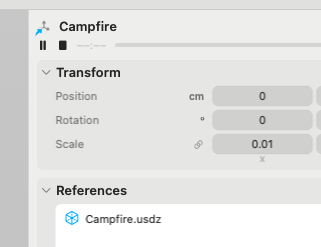
Make sure Loop is checked, then hit play —
press the ▶️ play button in the right sidebar to check that it's working.
Particle
Next, the particle settings.
There was no fire effect preset built in by default, so I set it up myself.
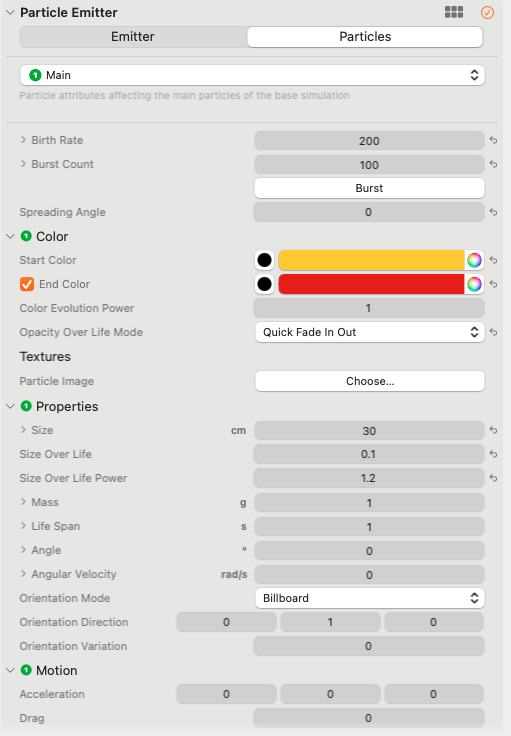
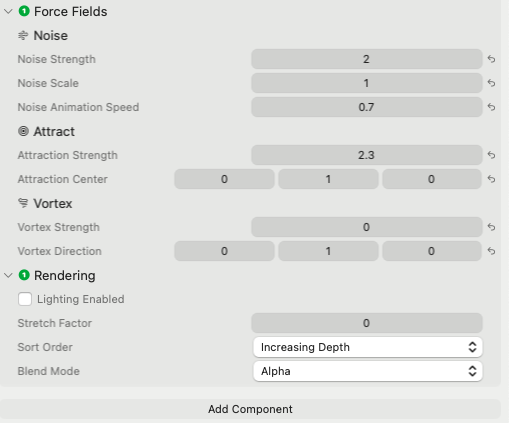
Something like this.
Setting Birth Rate to around 1000 gives a richer, more realistic look,
but pushing the number up too much seems to hurt performance, so I tried to keep it low.
With a low value,
the flame ends up looking sparse unless you set Size larger under Properties,
which gives it a slightly cheap look — but I decided that read as more of a pop, playful style, so I went with it.
When recreating fire, brightening the color at the center
and setting the tips to a reddish-brown with a bit of black mixed in gave a nice sooty look.
Setting Noise is a good idea, since it adds some randomness.
Be careful with the Attract setting — you need to set the vertical (Y-axis) value to positive and the other axes to zero, otherwise it ends up looking like the fire is being blown sideways by wind.
Setting Vortex adds a rotational look, so I turned that on too, just in case.
Wrapping up
I'll keep working on VisionOS development going forward. If you have any work inquiries, please reach out through the contact form.