
This time, I'll share the steps for deploying a React app to a Lolipop server using GitHub Actions, along with the problems I ran into along the way and how I solved them.
The working code
I'll cover the sticking points later — first, let me share the code that actually works!
1. What to do first
Push your React app to GitHub!
2. What to do on GitHub
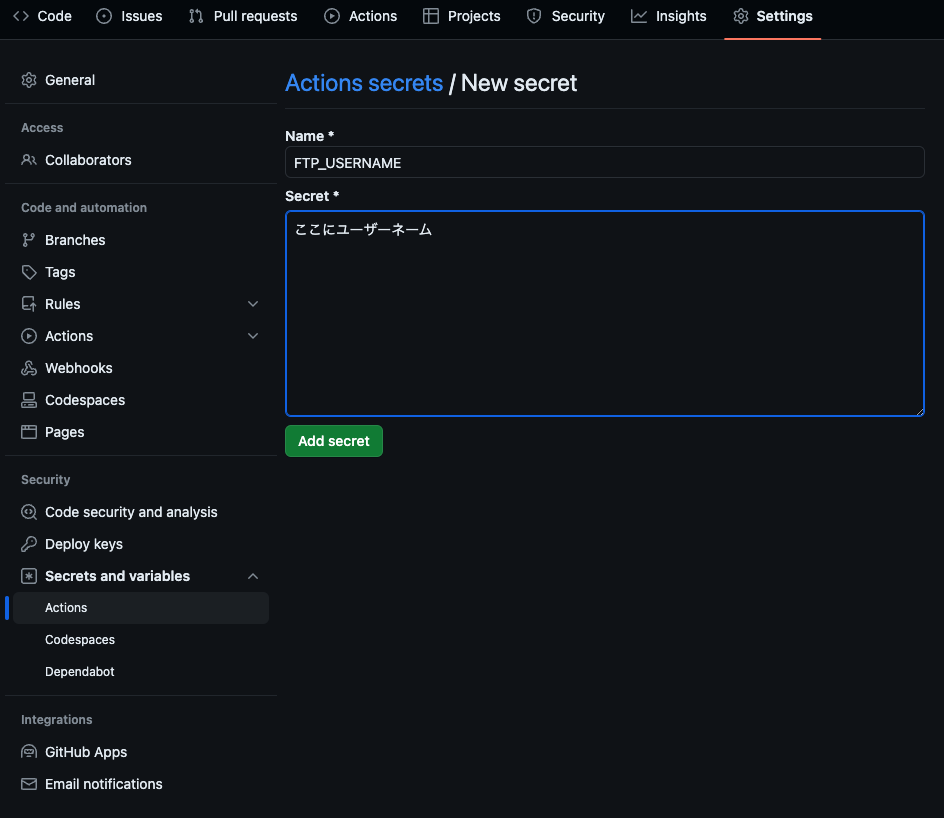
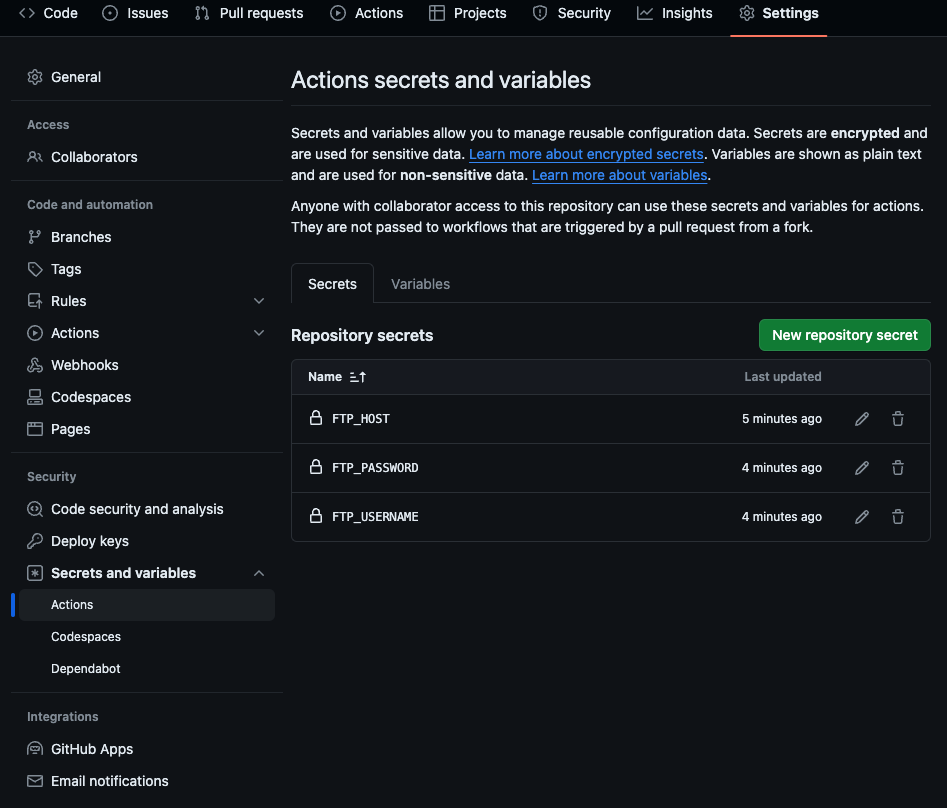
Open the Secrets and variables section from the Settings tab, and click "New Repository Secret."
Open Lolipop's Account Info / Change Password page. Enter each of the following
| Name | Secret |
|---|---|
| FTP_HOST | FTP server hostname |
| FTP_USERNAME | FTP account |
| FTP_PASSWORD | FTP password |
as a secret.
3. Add the workflow code
Now open your own code,
create a .github/workflows folder at the root of your repository,
and create lolipop.yml inside it.

name: Deploy React App to Lolipop

on:
  push:
    branches:
      - main

jobs:
  build:
    runs-on: ubuntu-latest

    steps:
      - name: Checkout repository
        uses: actions/checkout@v4

      - name: Set up Node.js
        uses: actions/setup-node@v4
        with:
          node-version: '20'

      - name: Cache dependencies
        uses: actions/cache@v4
        with:
          path: ~/.npm
          key: ${{ runner.os }}-node-${{ hashFiles('**/package-lock.json') }}
          restore-keys: |
            ${{ runner.os }}-node-

      - name: Install dependencies
        run: npm install
        # yarn の場合は下の行参考
     # run: yarn install --frozen-lockfile

      - name: Build the React app
        run: |
          CI=false npm run build

      - name: Upload to Lolipop via FTP
        uses: SamKirkland/FTP-Deploy-Action@4.3.0
        with:
          server: ${{ secrets.FTP_HOST }}
          username: ${{ secrets.FTP_USERNAME }}
          password: ${{ secrets.FTP_PASSWORD }}
          # 自分のサイトのディレクトリを指定する
          server-dir: hoge/
          local-dir: build/
          protocol: ftps
Once you've got this far, all you need to do is push, and it should deploy automatically!
Nice work!
How I got here…
The code I tried first
Here's what the lolipop.yml file originally looked like.
name: Deploy React App to Lolipop

on:
  push:
    branches:
      - main

jobs:
  build:
    runs-on: ubuntu-latest

    steps:
      - name: Checkout repository
        uses: actions/checkout@v2

      - name: Set up Node.js
        uses: actions/setup-node@v2
        with:
          node-version: '16'

      - name: Install dependencies
        run: npm install

      - name: Build the React app
        run: npm run build

      - name: Upload to Lolipop via FTP
        uses: SamKirkland/FTP-Deploy-Action@4.3.0
        with:
          server: ${{ secrets.FTP_HOST }}
          username: ${{ secrets.FTP_USERNAME }}
          password: ${{ secrets.FTP_PASSWORD }}
          local-dir: build
          server-dir: /public_html/hoge
Problem 1: Node version warning
The first problem was a warning that since Node.js 16 support had ended, actions/checkout@v2 and actions/setup-node@v2 needed to be updated to Node.js 20.
Node.js 16 actions are deprecated. Please update the following actions to use Node.js 20: actions/checkout@v2, actions/setup-node@v2. For more information see: https://github.blog/changelog/2023-09-22-github-actions-transitioning-from-node-16-to-node-20/.
The warning message
Rewriting it as follows fixed it
uses: actions/checkout@v4
uses: actions/setup-node@v4
with:
  node-version: '20'
Problem 2: A warning was halting the process
Embarrassingly, my code had an ESLint warning in it.
But this time, I just wanted to get it uploaded for now….
So I added the following code so the build would upload even with a warning.
run: |
  CI=false npm run build
Problem 3: A directory mistake
- name: Upload to Lolipop via FTP
        uses: SamKirkland/FTP-Deploy-Action@4.3.0
        with:
          server: ${{ secrets.FTP_HOST }}
          username: ${{ secrets.FTP_USERNAME }}
          password: ${{ secrets.FTP_PASSWORD }}
          server-dir: hoge/
          local-dir: build/
          protocol: ftps
For server-dir, make sure you don't forget to add a trailing "/".
Problem 4: Actions was too slow
It was taking a while between pushing and the deploy actually landing.
So I added a caching step.
- name: Cache dependencies
        uses: actions/cache@v4
        with:
          path: ~/.npm
          key: ${{ runner.os }}-node-${{ hashFiles('**/package-lock.json') }}
          restore-keys: |
            ${{ runner.os }}-node-
Wrapping up
And that's how to set up automatic deployment of a React app using GitHub Actions!
That's all — thanks for reading this post!
Here are some references, as a last note
Reference URLs
GitHub official docs
Heteml
https://tech.pepabo.com/2020/03/11/github-actions-for-lolipop-and-heteml
Lolipop official Note