
❓ What This Is About
I wanted to use an SSD as external storage across Windows, Mac, and Linux.
Here's how to format an SSD as ex-FAT on Ubuntu.
🪴 Environment
Distributor ID: Ubuntu
Description: Ubuntu 24.04 LTS
Release: 24.04
Codename: noble
🖐️ Steps
1. Install the Required Packages
Open a terminal
sudo apt install exfat-fuse exfatprogs2. If You'd Rather Use the GUI
Open Disks.
Select the disk you want to format.
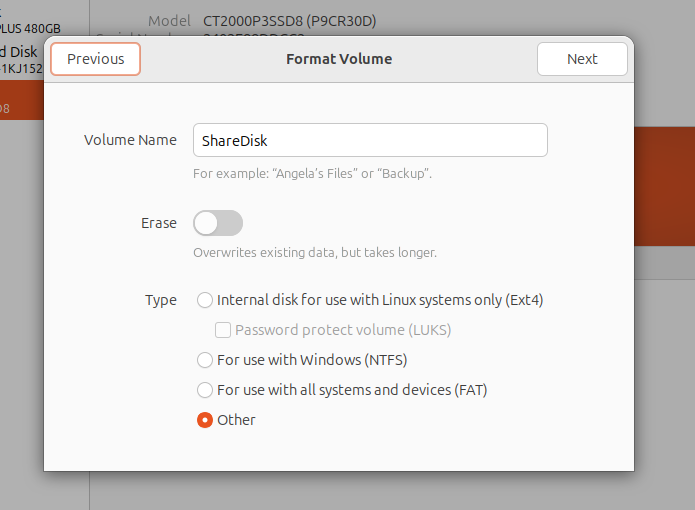
Click the plus button and give it a name.
For the format, choose Other.
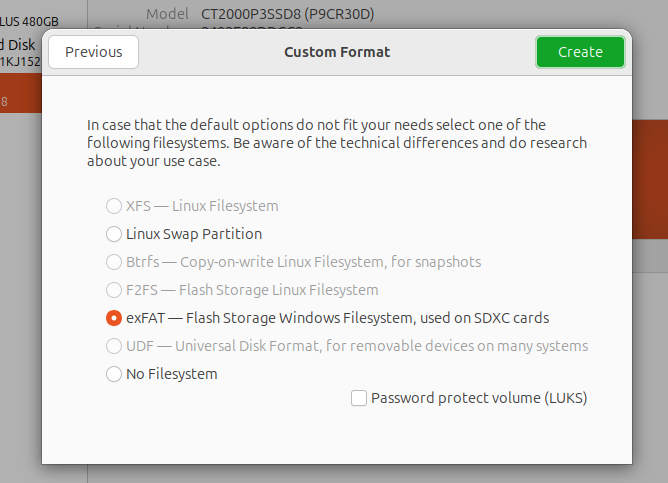
On the next page, exFAT should now be selectable.
2. If You'd Rather Use the CLI
Check the list of all hard disks
sudo fdisk -lFormat it as exFAT
sudo mkfs.exfat -n ShareData /dev/sdXnHere, we're naming the disk at device ID sdXn as "ShareData".
Verify the format
sudo fsck.exfat /dev/sdXnThis lets you confirm the disk was formatted correctly.