
❓ What This Is About
Whether you're on Linux, Mac, or Windows, formatting a disk means choosing a file system type at some point.
The Options
- Ext4
- NTFS
- FAT
- XFS
- Linux Swap Partition
- Btrfs
- F2FS
- exFAT
- UDF
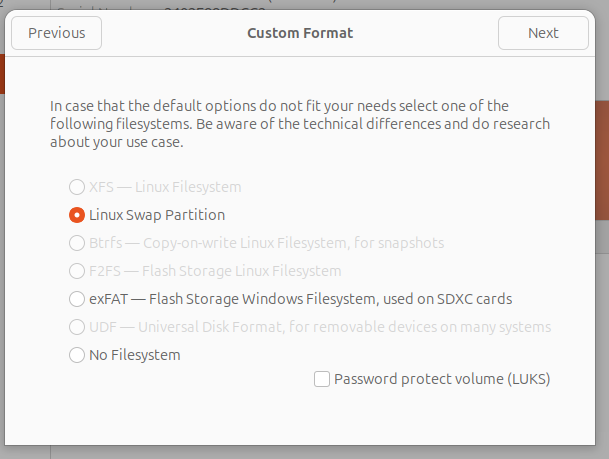
When formatting a disk with the Disks app on Ubuntu, you'll be offered file type choices like the ones above.
I've summarized what I could find in the table below. It's not exhaustive, and it leaves out exceptions like specific third-party software that adds Windows/Mac support.
| Ext4 | NTFS | XFS | FAT | exFAT | Linux Swap Partition | Btrfs | F2FS | UDF | |
|---|---|---|---|---|---|---|---|---|---|
| Windows support | No | OK | No | OK | OK | No | OK | No | OK |
| macOS support | No | Read Only | No | OK | OK | No | No | No | OK |
| File size limit | None (16TiB) | 16TB | None | 4GB | 128PB | – | ? | ? | ? |
| Mount size limit | None (1EiB) | 256TB | None (8EiB) | 2TB | 128PB | – | ? | ? | ? |
| chmod support | OK | △ | OK | No | No | – | OK | No | No |
| Typical use | Standard on Linux | Standard on Windows | For servers | Old but reliable (great compatibility) | A slightly nicer version of FAT | Space reserved for virtual memory | Modern Linux file system | For flash memory (SD cards, SSDs) | For optical media |
So Which One Should You Actually Use?
I initially reached for exFAT thinking it would work across every OS, but changing permissions on Linux turned out to be a pain, so in the end it seems best to just use whatever fits each OS.
Even file systems without official cross-platform support can sometimes be read and written to with third-party software, but for now I decided to play it safe and go with Ext4.
Reference Sites
On mounting Ext4 on macOS
https://zenn.dev/hogafuga_1114/articles/d2b4bf135e3de5
On running Btrfs long-term
https://gigazine.net/news/20200202-btrfs-five-years/
On working with Btrfs on Windows
https://softantenna.com/blog/winbtrfs
On F2FS support for Mac/Windows (the software below might make it possible)
https://www.paragon-software.com/free/pm-express/#