
❓ What This Is About
This post walks through getting Btrfs available as a file type when formatting a disk on Ubuntu.
We'll do as much of this as possible through the GUI.
🌵 Environment
- Distributor ID: Ubuntu
- Description: Ubuntu 24.04 LTS
- Release: 24.04
- Codename: noble
👈 Steps
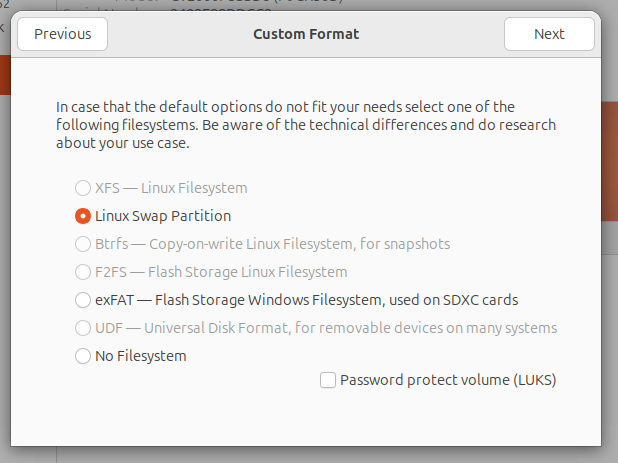
If you open the Disks app and try to format a disk, you'll find that Btrfs isn't selectable by default, as shown below.
Open a terminal.
First, the usual step — update all your packages with this.
sudo apt updateNext, install the Btrfs package. (The -y option lets you skip the Yes/No prompt.)
sudo apt install btrfs-progs -yThat's all it takes.
Open the Disks app and select your disk.
You should see a ⚙ gear icon below the volume graph —
select Format Partition… from there.
When choosing the file type, select Other and click Next, and
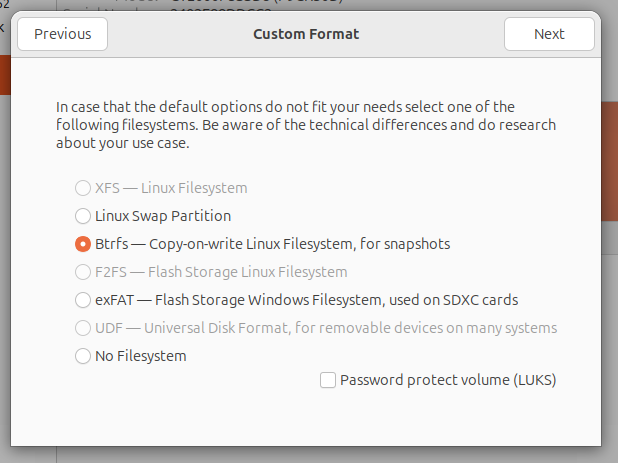
you should now be able to select it, like this!
That's it.